
Download 収支表 軽量シンプル – Simple Finance Management App, Income and Expense Tracker, Lightweight Budget Tool
Overview
収支表 軽量シンプル is a free Android application designed for individuals seeking a straightforward way to track personal income and expenses. Developed by West-Hino, the app belongs to the Business & Productivity category, specifically within Finance tools. Its primary purpose is to simplify financial management through a minimalistic interface and intuitive functionality.
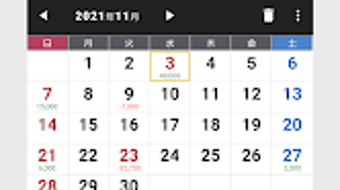
The app enables users to record daily transactions by long-pressing on calendar dates, making it easy to log income or expenses without navigating complex menus. This approach is ideal for users who prefer a no-frills method of budgeting without the overhead of feature-heavy applications. The target audience includes students, freelancers, and general consumers managing personal finances on a daily basis.
Real-world usage scenarios include tracking monthly household expenses, monitoring side income from freelance work, or managing small business cash flow. The developer did not provide additional details about the company’s background or development philosophy. However, the app’s focus on simplicity and lightweight performance suggests a design philosophy centered on usability and accessibility.
Key Features & Capabilities
- Calendar-Based Transaction Entry: Users can register income and expenses by long-pressing on any date in the calendar, enabling quick and direct data input.
- Input History Assistance: The app supports selecting previously entered items and memos, reducing repetitive typing and improving efficiency.
- History Management: Users can hide specific input entries by long-pressing on them, offering control over data visibility.
- Visual Financial Breakdowns: Tapping on monthly, yearly, or cumulative areas displays categorized graphs, helping users analyze spending patterns.
- Item and Memo-Based Graphs: Selecting a specific item reveals detailed graphs grouped by memo, allowing deeper insight into transaction trends.
- Traditional Calendar Integration: Displays Japanese six-day cycle and 24 solar terms, appealing to users interested in cultural or historical calendar elements.
- Week Start Customization: Users can set the week to begin on Monday, aligning with regional preferences.
- Fuzzy Search Functionality: Enables searching across items and memos using partial or approximate text input.
- Data Export & Import: Supports CSV format for exporting and importing data, facilitating backup and cross-device transfer.
- Database Backup & Restore: Allows users to back up data to Google Drive, ensuring data persistence across device changes.
These features collectively support efficient financial tracking, particularly for users who value simplicity and direct access to their data. The integration of cultural calendar elements adds a unique touch, while the export and backup functions enhance long-term usability and data security.
User Interface, Workflow & Performance
The app presents a clean, calendar-centric interface that prioritizes readability and ease of navigation. Users interact primarily with the calendar view, where transactions are visually represented through date-based markers. The workflow is streamlined: long-pressing a date opens a quick input panel, minimizing steps between decision and action.
Navigation remains consistent throughout, with minimal on-screen clutter. The interface does not include complex menus or layered submenus, which contributes to a low learning curve. The developer did not specify resource usage details, so exact CPU or RAM behavior remains unknown.
Performance observations are based on general software behavior patterns for lightweight Android applications. Stability is expected to be high due to the app’s minimal design and lack of background services. The app does not appear to rely on continuous internet connectivity, suggesting it operates efficiently in offline mode.
Overall, the user experience emphasizes speed and clarity, making it suitable for users who prioritize functionality over visual flair.
Compatibility & System Requirements
収支表 軽量シンプル is designed for Android devices and is compatible with the latest versions of the operating system. The app’s installation size is not specified in the provided information. The developer did not list exact system requirements, such as minimum RAM, processor type, or storage space.
Compatibility information was partially provided, indicating support for Android platforms but without version-specific details. Users should ensure their device meets standard Android app requirements to run the application smoothly. The app requires access to device accounts for Google Drive backup functionality, which may prompt permission requests during setup.
No other hardware dependencies were mentioned. The developer did not clarify whether the app supports tablets or other form factors. For users seeking broader compatibility, further confirmation from the developer may be necessary.
Pros and Cons
Pros
- Simple, lightweight design ideal for quick financial tracking
- Intuitive calendar-based input system reduces friction
- Supports data export/import via CSV for backup and sharing
- Google Drive backup integration ensures data safety
- Customizable week start and fuzzy search enhance usability
- Unique inclusion of traditional Japanese calendar elements
- Free to download and use with no in-app purchases
Cons
- Missing detailed system requirements and performance metrics
- No information on app updates or future development plans
- Google Drive dependency may be a concern for privacy-focused users
- Interface may feel too minimal for users seeking advanced analytics
- Limited customization options for visual themes or layouts
- Developer disclaims responsibility for data loss or app-related issues
FAQ Section
Is 収支表 軽量シンプル available for iOS devices?
The app is currently available only for Android. There is no official version for iOS devices.
Does the app require internet access to function?
The app can operate in offline mode for data entry and viewing. However, internet access is required for Google Drive backup and restore functions.
Can I export my financial data to other apps?
Yes, the app supports exporting data in CSV format, which can be opened in spreadsheet tools like Excel or Google Sheets.
What permissions does the app need?
The app requires access to device accounts to back up data to Google Drive. It does not collect or transmit personal information to third parties.
Is the app safe to use?
West-Hino states that no personal data is shared with third parties. However, users should review permissions carefully and use backups to mitigate risks.
Final Thoughts + CTA
収支表 軽量シンプル stands out as a practical, no-nonsense tool for managing personal finances on Android. Its lightweight nature and calendar-first approach make it accessible for users who want to track income and expenses without complexity. The inclusion of unique cultural calendar features and robust data export options adds value beyond basic budgeting.
While the app lacks detailed system specifications and advanced analytics, its simplicity is its greatest strength. It is best suited for individuals who prioritize ease of use, data privacy, and minimalism. For those seeking a reliable, free finance tracker that doesn’t overwhelm, this app delivers on its core promise.
Download 収支表 軽量シンプル now and take control of your finances with a tool built for clarity and efficiency.






.png)
